
(A follow-up to the “When IAM meets M&A: operational readiness beyond architecture” post)
In our previous post Keith discussed “what running the architecture means for IAM” and its impacts on everyday operations readiness, enablement, people, and process. In this article we will focus on what teams like network operations (NOC) actually do with the architecture; translating it into monitoring priorities, incident workflows, and automation strategies.
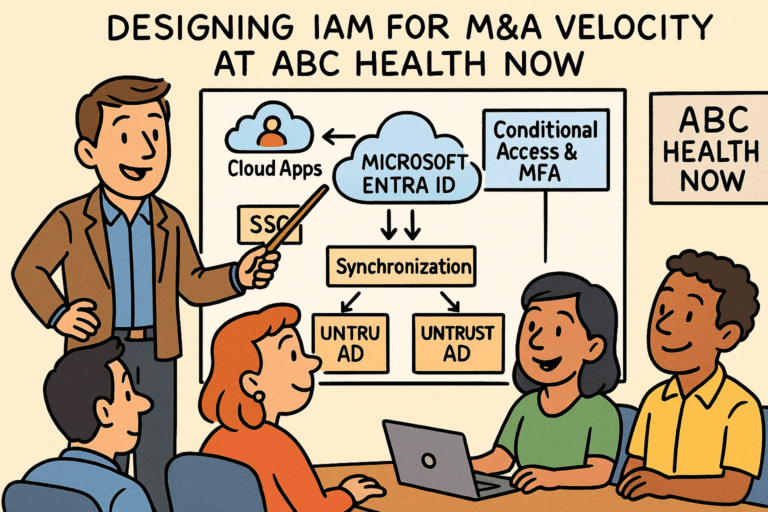
Mapping these components logically helps the network operations team know exactly which identity services must be continuously monitored to prevent outages, detect anomalies, and maintain secure, reliable access across newly integrated environments.
How This Helps Network Operations
Clear visibility into critical identity dependencies:
NOC teams know exactly which services directly impact user access.
Faster root-cause analysis:
The logical map shows where failures typically occur (sync agents, CA, MFA, DCs, SSO connectors).
Prioritized monitoring:
Focus shifts to identity components that are essential to business continuity.
Improved incident response:
Tools and logs are aligned with the architecture, allowing NOC teams to quickly identify authentication failures, service degradation, and upstream dependency issues.
Business-Critical IAM Components & What to Monitor
On-Premises Active Directory Forests (Untrusted)
Why It’s Critical: Each forest acts as its own authentication authority, creating multiple points of dependency that must remain stable. It is essential that network operations ensure these authentication domains remain healthy to maintain operational continuity and preserving productivity. Any issues directly affect authentication flows, which can quickly cascade into widespread issues.
What to Monitor:
- Domain controller health (CPU, memory, replication, DNS, Kerberos)
- Authentication latency
- Replication failures between DCs
- Password authentication failures via PTA
Tooling Examples:
- SCOM
- SolarWinds Server & Application Monitor
- AD Replication Status Tool
- ManageEngine ADAudit Plus
Microsoft Entra ID (Cloud Identity Plane)
Why It’s Critical: All authentication is anchored in Entra ID, making it a single point of dependency for the entire enterprise. For the network operations team, this underscores the critical need for continuous monitoring and proactive management to protect business continuity. Disruptions affect user access across merged organizations.
What to Monitor:
- Authentication success/failure rates
- Token issuance latency
- Service health / regional availability
- Directory synchronization status from multiple AD forests
- Conditional Access failures
Tooling Examples:
- Microsoft Entra Admin Center – Sign-in logs / Audit logs
- Azure Monitor (Log Analytics Workspace)
- Microsoft 365 Service Health Dashboard
- SIEM tools like Splunk or Sentinel
Entra Connect / Cloud Sync Agents (Per AD Forest)
Why It’s Critical: These agents ensure identities from untrusted environments are accurately synchronized into Entra ID.
It is essential the NOC maintain agent health ensuring seamless user access and uphold operational reliability across the enterprise.
What to Monitor:
- Sync job success/failure
- Password hash sync failures
- PTA (Pass-Through Authentication) agent health
- High CPU/memory on sync servers
- Connectivity to domain controllers and Entra ID
Tooling Examples:
- Azure AD Connect Health
- System Center Operations Manager (SCOM)
- Nagios / Zabbix / SolarWinds
Single Sign-On (SSO) for SaaS and Internal applications
Why It’s Critical: Single Sign-On (SSO) is the critical access gateway enabling user access to enterprise resources. Maintaining continuous SSO availability is essential to protect business continuity, minimize incident volume, and ensure uninterrupted access across the enterprise.
What to Monitor:
- Federation/SSO token issuance failures
- Application sign-in errors
- SAML/OAuth/OpenID Connect trust certificate expiration
- Application health / integration connector availability
Tooling Examples:
- Entra ID Enterprise Applications Logs
- Azure Monitor Application Insights
- ThousandEyes (for SaaS path tracing)
Conditional Access & MFA Services
Why It’s Critical: Conditional Access is the central control point for authentication and access decisions. For the network operations team, maintaining robust visibility into these controls is essential to ensure continuous service availability, minimize business disruption, and safeguard access to core infrastructure.
What to Monitor:
- MFA server / cloud MFA availability
- High volume of CA policy failures
- Policy misconfigurations triggering mass lockouts
- Risky sign-in spikes (indicating attacks)
Tooling Examples:
- Microsoft Sentinel with identity protection workbooks
- Azure Monitor Alerts
- Entra ID Identity Protection logs
How Business Automation Improves Efficiency
Business automations improve efficiency for the network operations team by streamlining routine identity and access management tasks, reducing escalations, alert fatigue, and the risk of delays or errors that could block users. This allows the team to focus on high-priority issues while ensuring timely, reliable access during M&A onboarding.
These are typical areas where automation drives efficiency and value for network operations:
- Automated User Provisioning and De-provisioning (SCIM/Entra Automation)
Ensures new employees, contractors, or acquired users are granted or removed access correctly without manual intervention, reducing common access-related incidents, and delays in access to applications. - Automated Password Resets and Self-service MFA Registration
Empowers users to resolve simple authentication issues on their own, preventing tickets from reaching the identity team.
- Automated Access Reviews & Role Assignment
Accelerates role assignment and ensures that compliance and security policies are consistently applied, avoiding errors that could cause login failures or security incidents, and minimizes over-permissioning.
- Automated Conditional Access Governance
Ensures security rules are consistently applied across all users and devices, reducing misconfigurations that typically trigger escalations. - Infrastructure-as-Code for IAM Configurations (Terraform, Bicep)
Allows repeatable, error-free deployment of identity configurations and synchronization across newly integrated environments, ensuring seamless and predictable onboarding during mergers. - Workflow Automation (Power Automate, ServiceNow Flows)
Can automatically route incidents, apply remediation steps, streamline user onboarding/offboarding, and log actions for auditing, further limiting unnecessary escalations.
- Automated Health Alerts & Event Aggregation
Reduces response time for identity-related incidents and aggregates low-impact events into a single actionable alert, preventing the team from being overwhelmed by repetitive notifications. - Intelligent alert filtering, Correlation and Routing
Automatically suppress alerts caused by known maintenance windows, benign system changes, or redundant signals from multiple monitoring tools. Route alerts to the right team or escalate only when thresholds are exceeded. Additionally, automated self-healing scripts can resolve common or predictable issues
Identity & Access Management Monitoring Matrix
Having identified the critical IAM components, the NOC now operationalizes the architecture through structured monitoring and defined responsibilities. The IAM Monitoring Matrix provides the network operations team with clear insight into essential identity systems, their behavior, and the indicators of potential issues.
| Component | What to Monitor | Business Impact if Degraded | Tooling Examples | Alert Severity |
| Microsoft Entra ID Tenant | Sign-in failures, token issuance latency, service health alerts | Users unable to access cloud applications; major outage | Entra Admin Center, Azure Monitor, M365 Health | Critical |
| Entra Connect / Cloud Sync Agents | Sync failures, connector health, password writeback errors | New users can’t authenticate; inconsistent identity data | Azure AD Connect Health, Azure Monitor, Event Logs | High |
| Domain Controllers (per forest) | Authentication latency, replication failures, service availability | PTA sign-ins fail; authentication delays | SolarWinds, SCOM, AD Replication Status, Splunk | Critical |
| Pass-Through Authentication Agents | Agent connectivity, queue delays, CPU/memory | Users from on-prem AD cannot authenticate | Azure Monitor, Entra Connect Health | High |
| SSO Token Services | Token issuance errors, certificate expiration, failed SAML/OIDC requests | SaaS and internal applications become inaccessible | Entra Sign-In Logs, Splunk, App Insights | Critical |
| Conditional Access Policies | Policy changes, failure rates, anomalous blocks | Incorrect policies can lock out large user groups | Entra Insights, Azure Monitor, Defender for Cloud Apps | High |
| MFA Providers (Microsoft Authenticator, SMS, etc.) | MFA failure rate, latency, provider availability | Users blocked from signing in; increased support volume | Entra Usage & Insights, Azure Monitor | High |
| Hybrid Connectivity | VPN/ExpressRoute latency, DNS issues, firewall blocks | Auth communication between cloud and AD forests breaks | ThousandEyes, SolarWinds, NetScaler, Firewalls | Critical |
| Identity Governance (Access Reviews, Lifecycle) | Job failure rates, workflow delays | Access remains stale; compliance risk | Entra Identity Governance, ServiceNow | Medium |
| Audit & Logging Pipeline | Log ingestion failures, storage limits | Loss of audit data; compliance gaps | Splunk, Elastic, Azure Log Analytics | Medium |
Identity & Access Management RACI Matrix
The IAM RACI Matrix establishes clear roles and responsibilities for managing identity and access systems, minimizing confusion during routine operations and incident response. It provides the network operations team with accountability for monitoring, troubleshooting, and maintaining critical components.
Roles Defined
- NOC: Network Operations Center
- IDEN: Identity Engineering Team
- SEC: Security Engineering / IAM Security
- APP: Application Owners
- CIO/Leadership: Executive Oversight
RACI for IAM Operations
| Task / Area | NOC | IDEN | SEC | APP | CIO |
| Monitor Entra ID tenant health | R | A | C | C | I |
| Manage Entra Connect / Cloud Sync | C | A | C | I | I |
| Troubleshoot sync failures | R | A | C | I | I |
| Maintain on-prem AD domain controllers | R | A | C | I | I |
| Pass-Through Authentication agent management | R | A | C | I | I |
| Configure SSO for SaaS and internal apps | C | A | C | R | I |
| Monitor SSO endpoint availability | R | A | C | C | I |
| Manage Conditional Access policies | I | C | A | I | I |
| Monitor Conditional Access & MFA enforcement | R | C | A | I | I |
| Respond to MFA outages | R | A | C | I | I |
| Monitor hybrid identity connectivity (VPN, DNS, ER) | A | C | C | I | I |
| Incident response for identity outages | A | R | C | C | I |
| Certificate lifecycle management (SSO, token signing) | C | A | C | C | I |
| Identity governance processes (access reviews) | I | C | A | R | I |
| Audit logging pipeline maintenance | R | A | C | I | I |
| Compliance reporting | I | C | A | I | R |
| Communication to business during outages | A | C | C | C | R |
Where Keith’s prior post explored how architecture shapes real-world operations and readiness, this article shows how the NOC turns that architecture into day-to-day monitoring discipline and incident clarity. Together, these perspectives form the technical and operational backbone required to onboard new entities quickly and securely during M&A.