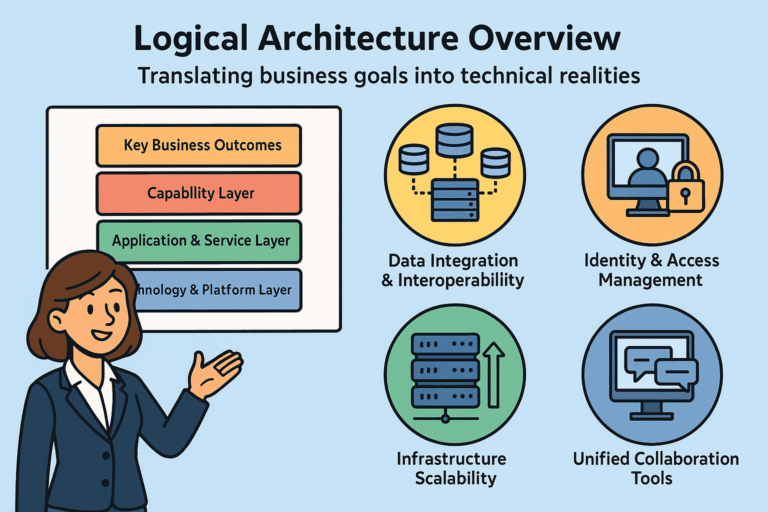

Last time, we covered how logical architecture drives operational readiness. This week, we’re zeroing in on the key capabilities of Identity and Access Management.
Many organizations face similar identity and access management (IAM) challenges as illustrated in our fictional example of ABC Health Now. Ensuring users can seamlessly access tools, applications, and data from their first day remains a common pain point across industries. Addressing this challenge effectively is essential to improving productivity, reducing onboarding friction, and strengthening overall security posture.
When ABC Health Now acquires new organizations, one of the most complex and high-risk challenges they face is integrating the acquired company’s untrusted “command and control” infrastructure, such as Active Directory (AD). These environments often lack standardized governance, making it difficult to establish secure and reliable connectivity with ABC Health Now’s core systems.
This integration is typically a temporary measure to maintain business continuity while legacy applications and systems are phased out, but demands substantial effort and resources. This temporary coexistence introduces operational inefficiencies, increases security risks, and complicates identity management. As a result, what should be a transitional process consumes significant time and cost, diverting focus from strategic transformation and long-term goals.
Today, we are highlighting a critical component of ABC Health Now’s logical IT architecture: identity and access management. This capability ensures secure, seamless, and efficient access to resources across the organization to expedite decision-making, and operational efficiency, so the organization can execute strategic goals with confidence and agility.
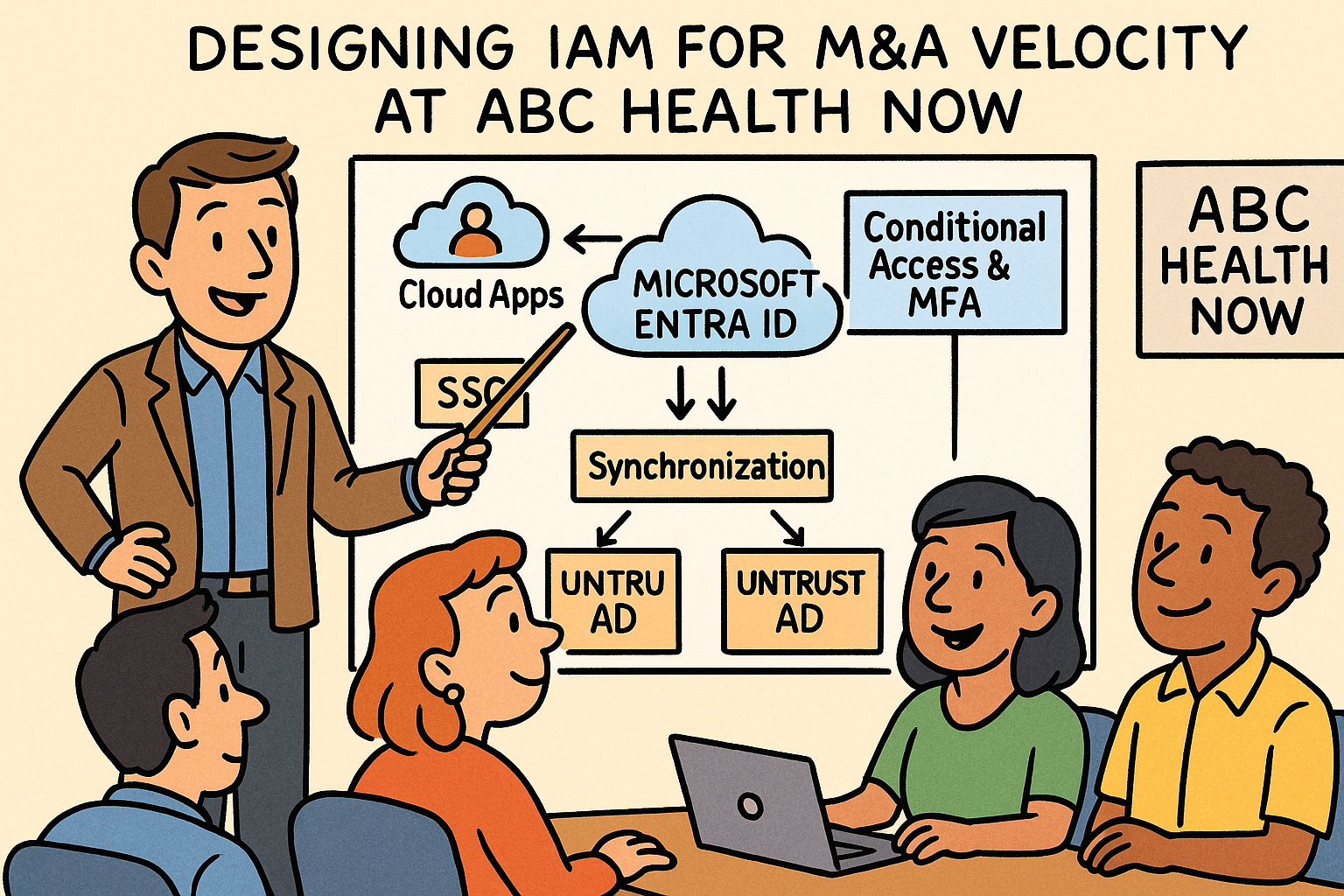
ABC Health Now decided to standardize on a single cloud provider for IAM needs. When new organizations are acquired their Active Directory will be integrated with Microsoft Entra ID. This decision enables secure, and rapid identity integration, allowing users from untrusted environments to authenticate, and be governed under consistent access and security policies.
We will first breakdown the specific IAM components of the logical IT architecture, then explore the logical flow with and end-to-end example, and relationship summary.
Logical Component Breakdown
On-Premises Active Directory Forests (Untrusted)
An untrusted Active Directory forest is a separate IT environment that your systems do not recognize or trust. When ABC Health Now acquires a company both have their own IT environments built independently.
- Role: Represents pre-merger identity silos (Forest A, Forest B) without trust relationships to each other or the parent company environment.
- Challenge: Each AD forest has its own users, groups, and authentication authority which is not accessible from other environments.
- Logical Solution:
- Each forest uses Entra Connect to synchronize user identities to the same Entra ID tenant (environment).
- Password authentication methods allow sign-in parity without forest trust.
- Optionally, federated authentication (ADFS) can be used for transitional identity bridging.
Microsoft Entra ID (Cloud Identity Plane)
- Role: Serves as the centralized identity and access management layer across the enterprise, enabling consistent policies for authentication, authorization, and governance.
- Core Functions:
- Acts as the authoritative directory (source of truth) for all identities.
- Provides federation, synchronization, and conditional access controls.
- Integrates with on premise AD forests through synchronization models.
Key Elements:
- Entra Connect: Synchronizes identities from multiple Active Directories to a unified Microsoft Entra tenant supporting untrusted forests.
- Entra ID Tenant: Acts as the logical trust anchor where all users and applications ultimately authenticate or are represented.
- Cross-Tenant Access: Enables collaboration across entities until environments are consolidated.
Single Sign-On (SSO)
- Role: Provides seamless access to SaaS and internal applications using Entra ID as the identity broker.
- Logical Flow:
- A user signs into a cloud or hybrid application.
- The application redirects authentication to Entra ID.
- Entra ID validates user credentials (from synchronized AD identity or cloud native user).
- Conditional Access policies evaluate risk, device state, and MFA requirements.
- Once verified, Entra ID issues a security token granting access.
- How It Complements Entra ID:
- Uses Entra ID as the identity provider (IdP) for all applications (Microsoft 365).
- Reduces credential sprawl by centralizing trust in Entra ID rather than multiple AD forests.
- Enables cross-company user access via cloud identity, even without AD trusts.
Conditional Access & Multi-Factor Authentication (MFA)
- Role: Provides adaptive, policy-driven access control based on risk and context.
- Logical Operation:
- Policies are evaluated after authentication but before token issuance.
- Contextual conditions include device compliance, location, user risk, and sign-in behavior.
- Triggers MFA or blocks access based on policy rules.
- Integration Points:
- Entra ID: Policies are centrally defined and enforced during token issuance.
- SSO: Works transparently across all SSO-enabled applications, ensuring a unified security posture.
- On-Premises Active Directory: Users synced from AD are still subject to the same cloud access policies, maintaining consistent control regardless of their on-premise origin.
Logical Relationship Summary
This summary clarifies how each IAM component interacts and supports the overall identity framework of the logical IT architecture. It highlights dependencies and complementary functions, showing how the elements work together to enabling access across multiple systems and organizations.
| IAM Element | Primary Role | How It Complements Others |
| On-Prem AD Forests | Source of authoritative user accounts | Provide user credentials and attributes for Entra ID synchronization |
| Microsoft Entra ID | Central cloud identity authority | Integrates all identity sources and enforces unified policies |
| SSO | Simplifies access to applications | Leverages Entra ID tokens for unified authentication |
| Conditional Access & MFA | Adds adaptive security | Extends Microsoft Entra authentication with contextual risk checks |
Logical Flow (End-to-End Example)
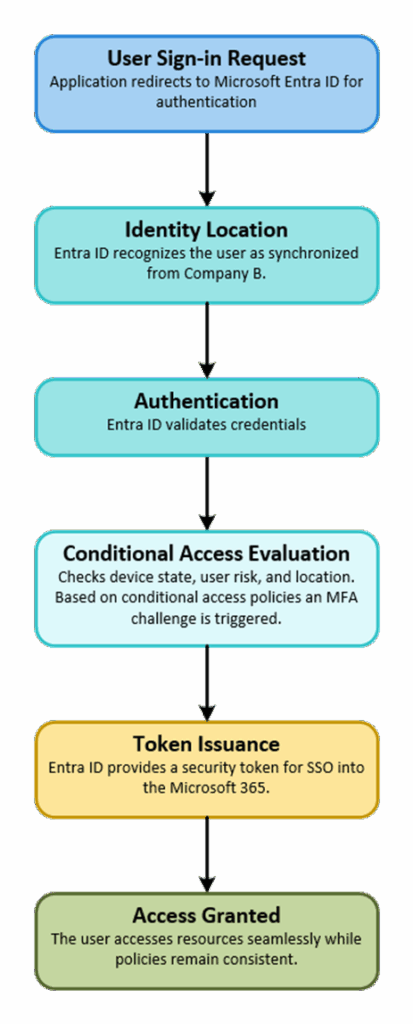
The example below illustrates how a user’s authentication request moves through the IAM system, showing step-by-step interactions between logical components. It demonstrates how these elements work together in practice to provide secure, seamless access while enforcing policies and maintaining control.
- Scenario: A user from an acquired company’s untrusted AD signs into Microsoft 365.
- User Sign-in Request → Application redirects to Microsoft Entra ID for authentication.
- Identity Location → Entra ID recognizes the user as synchronized from Company B.
- Authentication → Entra ID validates credentials.
- Conditional Access Evaluation → Checks device state, user risk, and location.
- Based on conditional access policies an MFA challenge is triggered.
- Token Issuance → Entra ID provides a security token for SSO into the Microsoft 365.
- Access Granted → The user accesses resources seamlessly while policies remain consistent.
This helps IT demonstrate to the business how it will deliver capabilities aligned with the conceptual architecture with a focus on systems.
Our next post will examine the transformational impact of IAM and the playbook for operational readiness in this use case.